There are dozens of website builders out there, and every one of them claims to be perfect for small businesses. The reality is more nuanced. The right platform for a local plumber in Worthing looks very different from the right platform for a growing online clothing retailer in Manchester. Getting this choice wrong costs you time, money, and often a complete rebuild a year down the line.
This guide walks you through a clear decision process so you can pick the tool that actually fits your business, not just the one with the best marketing.
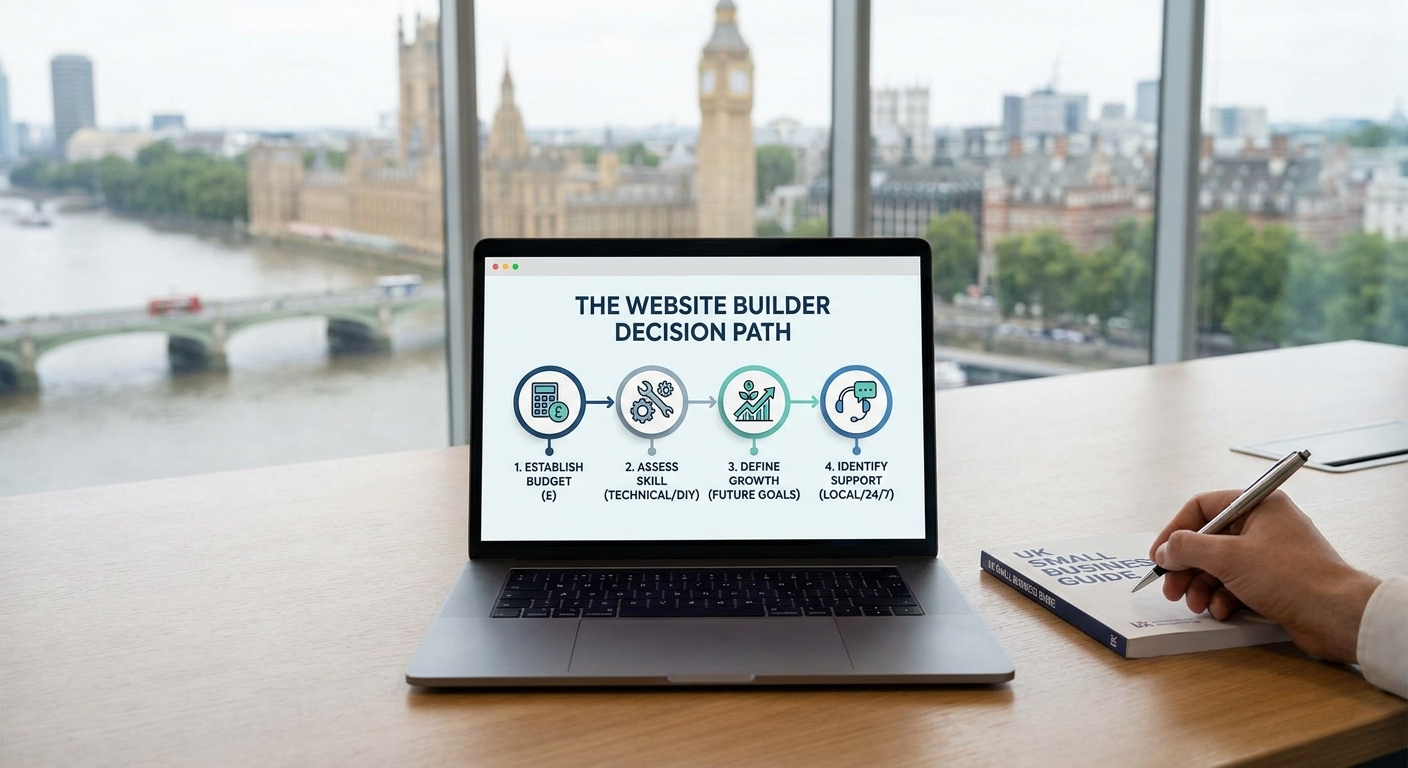
Start With Your Budget (Be Honest About It)
Before you look at features, nail down what you can realistically spend each month. Most website builder pricing has two layers: the platform subscription and the extras that pile on top.
Here is what realistic monthly costs look like in 2026:
- Free or near-free tiers: Wix and WordPress.com both offer free plans, but they come with the platform's branding on your domain, which looks unprofessional to customers.
- Entry level (around £10-£20/month): Enough to get a clean, branded site on Wix, Squarespace, or WordPress.com without major restrictions.
- E-commerce ready (£25-£60/month): Shopify's core plans sit here, as do Squarespace's Commerce tiers and Wix's Business plans.
- Growth and scale (£60+/month): Advanced Shopify, Wix Enterprise, or moving to a self-hosted WordPress setup with premium hosting.
Factor in your domain name (typically £10-£15 per year), any premium themes, and paid apps or plugins. A Shopify store with five apps can quietly creep from £29 to £80 a month before you have noticed.
Be Realistic About Your Technical Skill Level
Website builders exist on a spectrum from fully visual drag-and-drop to code-optional tools that reward people who know their way around HTML and CSS. Placing yourself honestly on that spectrum saves a lot of frustration.
If you want to build the site yourself with minimal technical knowledge, Wix is genuinely the most forgiving option. Its editor is visual and immediate, and it covers the majority of small business use cases well. Squarespace is slightly more structured but produces cleaner-looking results out of the box and suits businesses where design matters, such as photographers, studios, or consultancies.
If you are comfortable following tutorials and do not mind a learning curve, WordPress.com (or self-hosted WordPress.org) gives you far more control and flexibility. It powers roughly 43% of all websites globally, which means there is a solution to almost every problem somewhere in the community. The trade-off is that you need to manage updates, plugins, and occasionally troubleshoot things yourself.
Webflow sits at the more technical end of the DIY spectrum. It is excellent for custom designs but expects you to understand layout concepts. Unless you have a background in design or development, it is probably overkill for a small business site.
Think About What Your Site Actually Needs to Do
A website builder that is great for a portfolio is not necessarily great for selling products. Map out your core requirements before you compare platforms.
Ask yourself:
- Do I need to take online payments, or just display products and take enquiries?
- Will I be running a blog to attract search traffic?
- Do I need booking or appointment functionality?
- Will I be managing the content myself on a regular basis?
- Do I need to connect the site to tools like Mailchimp, a CRM, or accounting software?
For straightforward service businesses (trades, consultants, local shops without online sales), Wix or Squarespace covers everything comfortably. For anyone planning to sell products online at any real volume, Shopify is worth the extra cost. Its checkout, inventory management, and payment processing are purpose-built for e-commerce in a way that the others simply are not.
Consider Your Growth Plans
The cheapest option now can become the most expensive option later if it forces a rebuild. Think 18-24 months ahead.
If you expect to grow from 10 products to 500, or from a local audience to a national one, you want a platform that scales without charging you at every step. Shopify handles high-volume e-commerce well. WordPress, particularly self-hosted with WooCommerce, gives you the most flexibility for complex growth scenarios because you own your setup completely.
Wix and Squarespace are excellent for small to medium-sized businesses, but both have ceilings. Very large product catalogues, complex membership systems, or highly customised functionality can strain them. If those are on your horizon, factor that in now.
Do Not Underestimate Support
When something breaks or you cannot figure out how to do something, where do you turn? This matters far more than most people expect when they are setting up.
Wix and Squarespace both offer 24/7 customer support, which is genuinely useful for non-technical business owners. Shopify's support is well-regarded and has live chat. WordPress is supported by a huge community of forums, documentation, and developers, but there is no single help desk to call, so you either need to know someone or be comfortable searching for answers.
If you would rather hand the whole thing to a professional and focus on running your business, a web design agency builds on these same platforms (or bespoke code) and handles everything from setup to ongoing changes. For many small business owners, that is the right call, particularly when the site needs to work hard from day one.
A Simple Decision Framework
Use this as a quick reference:
- Service business, DIY, low budget: Start with Wix on a Core or Business plan.
- Design-led business (studio, photographer, consultant): Squarespace gives you a polished result without much effort.
- E-commerce from the start: Shopify, even if you only have a handful of products. It grows with you.
- Blog-heavy or content-driven site: WordPress.com, or self-hosted WordPress if you want full control.
- Complex requirements or no time to manage it yourself: Work with a web design professional who can recommend and build the right setup for your specific needs.
One Final Thing to Remember
No platform is perfect. Every one of them has limitations and trade-offs. The goal is not to find the flawless tool. It is to find the one that fits your business right now, with enough room to grow, at a price that does not hurt.
If you are still unsure after working through this, talking to a local web design agency costs nothing upfront and can save you from an expensive wrong turn. The best website for your business is the one that brings in customers. Everything else is secondary.